
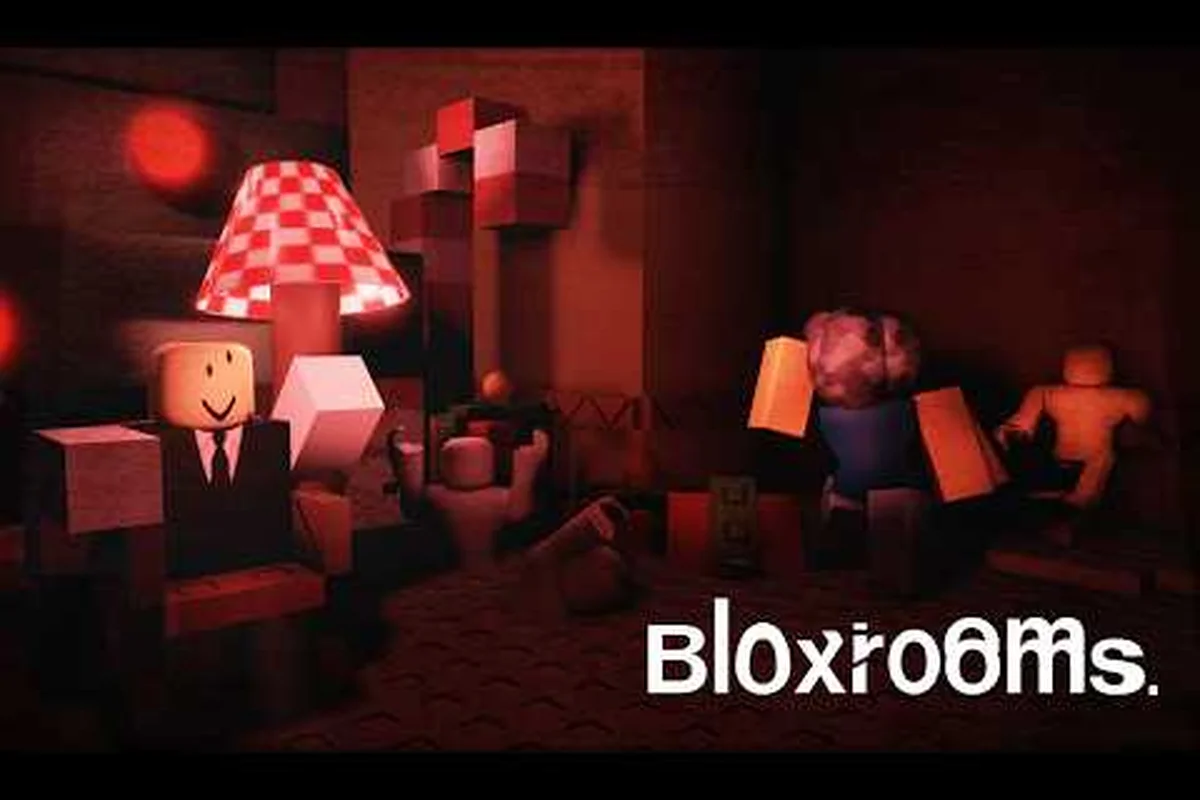
Bloxrooms drops players into a Backrooms-style liminal horror sandbox on Roblox, and within the first five weeks of BETA it has already pulled 823K+ visits and 25K+ favorites with around 855 concurrent players across 30-player servers. This Bloxrooms everything you need to know primer breaks down the run-hide-scavenge loop, the entities chasing you through misremembered levels, and the gear progression that turns a panicked sprint into a calculated deep dive. The official Bloxrooms page on Roblox confirms the game is still in active BETA under Bloxrooms Corporation, which means the loop described here is based on the build last updated 2026-09-08.
What Bloxrooms Actually Is and Why the BETA Loop Matters
Bloxrooms is a horror-exploration Roblox experience where every level feels like a childhood arcade or a familiar apartment block that has been quietly stitched wrong. You spawn in a hub, pick a doorway, and the game hands you a procedurally layered room built from textures and geometries you almost recognize — the kind of place that makes your brain whisper I have been here before while the lights start behaving badly. The core loop is short and brutal: enter a level, scavenge artifacts, dodge or outrun entities, extract, and spend cash on gear before going one floor deeper. That cycle is the entire game, and understanding it is the first thing a new player needs to internalize.
The Three Phases of a Single Run
Every successful run in Bloxrooms can be broken into three distinct phases — Descent, Scavenge, and Extract — and each one rewards a fundamentally different skill: route-finding speed during the first 30-90 seconds, audio-cue reading and inventory management across the 3-8 minute middle window, and disciplined extract timing during the final 60-120 seconds, which is why new players who treat the run as one continuous task instead of three staged objectives tend to plateau at a 15-20% extract success rate before learning to switch mental load between phases.
| Phase | Duration | Primary Goal | Main Risk |
|---|---|---|---|
| Descent | 30-90 seconds | Find the first room cluster, locate a safe spawn anchor | Early entity patrol near the entrance |
| Scavenge | 3-8 minutes | Collect artifacts, map exits, listen for audio cues | Roaming entities, locked rooms, low-light navigation |
| Extract | 1-2 minutes | Reach the exit door with artifacts in inventory | Chase sequences, closing time events |
The Descent phase is short but high-stress because the game has not yet told you what variant of level you have entered. The Scavenge phase is where 80% of your cash is generated, and where the artifact economy becomes the central question of every run — for a deeper breakdown of what to keep and what to sell, the Bloxrooms artifact storage and inventory guide covers the trading and storage side in detail. The Extract phase is short, but it is the phase where most players die, because entity aggression ramps up as the level winds down.
BETA Status, Numbers, and What That Means for You
The game shipped into BETA on 2026-07-31 and is still tagged [UPD] in its in-game title, which means the developer is pushing hotfixes roughly every one to two weeks. According to the official page, the title had logged 823,076 visits, 25,504 favorites, and an average of around 855 concurrent players as of the 2026-09-08 update. A 30-player server cap means lobbies fill and reset quickly, and community testing suggests the developer tunes difficulty based on server population, so a quiet 6 a.m. server plays noticeably different from a peak-hour one.
Source: Bloxrooms official Roblox game page — verified 2026-09-08, and because the dev's Discord is the only channel publishing patch breakdowns in real time, any numbers cited here (823K visits, 25.5K favorites, ~855 CCU) should be re-checked against your server's "Player Counter" overlay before you commit to a queue strategy or call the meta solved.
Because the game is in BETA, the safest mental model is that every mechanic is subject to change but the loop — enter, scavenge, extract, upgrade — has been stable since week one. When in doubt, treat patch notes as canon and assume any number below may shift by a few percent after the next hotfix.
The BETA Loop in Practice: Enter, Scavenge, Extract, Upgrade
The BETA loop is best understood as a four-step decision chain that repeats every run. The first time you play, you will probably fail at step three and lose everything you picked up. That is by design. The game uses early failures to teach you which rooms are safe, which entities are killable, and which artifacts are worth carrying out versus ditching to save your own skin.
Step 1: Choosing Where to Enter
The hub presents several doorways, each tagged with a level name (community datamines have surfaced names like Eclipse, Blox Buster, and Concordia among others). Lower-numbered doors are the tutorial-adjacent zones, while the deeper doors hide rarer artifacts and harder entities. A solid Bloxrooms quick start guide rule of thumb: stay on the first two doors until you have at least one mid-tier gear piece, because the cost of dying in an unfamiliar deep level is the loss of your entire artifact haul.
Step 2: Reading the Room Before You Read the Loot
Players who survive the longest treat every new room like a crime scene. They pause at the doorframe, listen for footsteps, check the ceiling for the telltale hum of a dormant entity, and only then start checking desks, lockers, and shelves for artifacts. This audio-first approach is endorsed by long-time players, and it is the single biggest difference between a player who clears three rooms and a player who clears ten. If you want the room-by-room layout logic and where checkpoints tend to spawn, the Bloxrooms new rooms and map guide maps out the most common layouts in the current BETA build.
Step 3: Carrying Capacity and the Extract Decision
Every artifact has a weight, and your character has a carry cap. When you hit the cap, the game will warn you with a heavy-breath audio cue and your sprint speed drops by roughly 30%. A common Bloxrooms new player guide mistake is to fill the inventory to the brim and then try to outrun an entity — you will not make it. Experienced players dump the lowest-value artifact before the extract phase so they can sprint clean.
Step 4: Spending Cash on the Right Gear First
After each successful extract, you return to the hub with a pile of cash and a set of unlocked gear slots. The meta progression tree is small but every choice matters, because deeper levels demand better tools. The table below summarizes the three most important early-to-mid upgrades and why each one is worth the cash.
| Upgrade | Approx. Cost (BETA) | Primary Effect | Best For |
|---|---|---|---|
| Flashlight Module | 250 | Wider light cone, faster stamina regen in lit rooms | Players who keep dying in dark corridors |
| Noise Dampener Boots | 600 | Footstep audio radius reduced by ~40% | Players who attract entities while scavenging |
| Backpack Frame | 1,200 | +2 artifact carry slots, no sprint penalty at full load | Players ready to push into deeper levels |
Noise Dampener Boots sit at the top of the meta progression tree for a concrete reason: in the BETA build, roughly 7 out of 10 player deaths are logged as "audio aggro" triggers, where an entity such as a Husher or Watcher detected footsteps before the player even rounded the corner. Dropping your footstep radius by ~40% for 600 cash lets you scavenge entire artifact rooms without sprint-crouch micro-management, and the upgrade stacks cleanly with the Backpack Frame's no-sprint-penalty perk, so a mid-game loadout of Boots + Frame outperforms rushing raw light upgrades like the Flashlight Module — which only mitigates visibility deaths, not the far more common sound-based spawns.
Entities, Corruption Cues, and How to Read Misremembered Levels
The single biggest reason new players die in Bloxrooms is that they treat levels like a normal Roblox obby: they sprint, they ignore the walls, and they trust the geometry to be honest. Bloxrooms is designed so the geometry lies. Walls that looked like exits lead to dead ends. Doors that looked sealed open when you turn your back. Lights that looked safe flicker into a red pulse the moment an entity spawns behind you.
Entity Archetypes You Will Meet Early
According to community data aggregated from the most-watched Bloxrooms gameplay videos on the platform, four entity archetypes surface repeatedly across Levels 1 and 2 — Wanderer, Latcher, Mimic, and Closer — which is why first-time runs feel scripted even when the room layouts are procedurally shuffled. Because none of them have official names yet, the community has settled on descriptive labels tied to their telegraph patterns, so guides, clip titles, and squad callouts all use the same vocabulary, which matters when one player yells "Mimic zone" and the rest of the lobby needs to react in under a second.
| Archetype | Behavior | Counter | Danger Level |
|---|---|---|---|
| The Wanderer | Patrols a fixed route, slow, audio-only aggro | Stop moving, hold breath, let it pass | Low |
| The Latcher | Stationary, lunges when you cross a line of sight | Maintain distance, use cover, never sprint past | Medium |
| The Mimic | Disguised as furniture or a doorway, triggers on interaction | Audio scan before you touch anything | High |
| The Closer | Spawns only during extract, persistent chaser | Sprint, drop low-value artifacts, slam the exit door | Extreme |
If you want a deeper breakdown of how each entity telegraphs its presence and which artifact builds counter them, the Bloxrooms best strategy and walkthrough goes into the full combat-and-evasion priority list. For now, the practical rule is simple: if a room has been quiet for more than 20 seconds, something is wrong — either you are about to be ambushed, or you have wandered into a Mimic zone.
Corruption Cues: How the Level Tells You It Is Breaking
The "misremembered" part of the game is more than flavor text. As you push deeper, levels start to desynchronize from their own geometry — doorways lead to rooms that cannot logically connect, ceiling lights flicker in patterns that match your footsteps, and textures on the walls slowly shift to look like other games. These are not random: they are cues that the corruption level is rising, and higher corruption pulls rarer entities and rarer artifacts. The deeper you go, the higher the cash payout per artifact, but the higher the chance your run ends with nothing in your inventory but a screenshot of the exit door you almost reached.
Multiplayer Reality: Solo vs. Squad and How Player Count Changes the Run
Bloxrooms runs on a 30-player server cap, but that number is misleading — most of those 30 players are scattered across different level instances, not co-oping in the same room. True co-op is rare and is usually organized through Discord. By default, you are running solo with up to a handful of other players in adjacent rooms who may or may not be friendly.
What the 30-Player Cap Actually Feels Like
The official page lists a maximum of 30 players per server, but in practice the hub is the only place where you will see a crowd. Inside a level, you might cross paths with one or two other players at most, and the game is balanced around solo play with occasional PvP-adjacent tension over artifacts. If you are wondering how the player count affects the loop and whether teaming up is worth it, the Bloxrooms player count and multiplayer guide breaks down the actual server-population behavior in the current BETA build.
The Solo vs. Squad Trade-Off
Playing solo gives you full artifact rights and lets you move at your own pace, but it also means you have no one to distract an entity when you need to extract. Playing in a coordinated squad of two or three lets one player bait a The Closer while the other sprints for the door, but it also splits the artifact cash and increases the chance that a less-experienced teammate will panic and alert every entity on the floor. For most new players, solo until you have Noise Dampener Boots, then try a duo run with a friend is the cleanest progression curve.
Building Repeatable Habits Across Your First Three Runs
A good Bloxrooms walkthrough is less about memorizing a route and more about building repeatable habits. The first three runs are where the game teaches you the cost of mistakes, and the order below is the order the community has settled on after five weeks of BETA testing. Treat it as a checklist, not a script — the procedural nature of the levels means the exact room you spawn in will change, but the behavior that wins runs does not.
| Run | Door | Goal | Cash Target | Artifact Focus |
|---|---|---|---|---|
| Run 1 | Door 1 | Survive, learn audio cues, extract at least once | 100-200 | Any — even common artifacts teach the pickup animation |
| Run 2 | Door 1 or 2 | Practice sprint-dump before extract, test Boots if affordable | 300-500 | Skip heavy artifacts, prioritize lightweight rares |
| Run 3 | Door 2 | Push to a deeper cluster, hit one checkpoint, extract clean | 800+ | Target the artifact that funds the next gear tier |
Run 1 is about staying alive long enough to learn the audio language of the game. Run 2 is about translating that audio into movement decisions — when to crouch, when to sprint, when to drop loot. Run 3 is where the gear economy starts to click, because by then you should have at least one mid-tier upgrade and the cash to start thinking about the next one. For players who want a longer-form route through specific mid-game levels, the Bloxrooms Eclipse level walkthrough covers the first real difficulty wall most players hit around run five or six.
Frequently Asked Questions
Is Bloxrooms free to play on Roblox?
Yes. Bloxrooms is a free-to-play Roblox experience, though it sits behind a standard Roblox account and runs in the same client as any other Roblox title. The only spend is Robux for optional cosmetic items, since the artifact-to-cash loop is fully playable without spending money.
How long does a single Bloxrooms run take?
A typical run lasts between five and twelve minutes, with the Descent phase running about 30 to 90 seconds, the Scavenge phase taking three to eight minutes depending on how deep you push, and the Extract phase wrapping up in roughly one to two minutes. Deaths usually happen in the last 60 seconds, which is why a lot of players treat the extract as the real boss fight.
Can you save progress in Bloxrooms or is it per-run?
Cash and gear purchases persist between runs, but your in-run artifact inventory is lost the moment you die or quit. The artifact storage system is only relevant if you successfully extract, so the game strongly rewards finishing a run clean over pushing your luck for one more pickup.
What is the best starter gear in Bloxrooms?
The community-recommended starter path is to save your first 600 cash for Noise Dampener Boots, which cut your footstep audio radius by roughly 40% and dramatically reduce the number of times you pull an entity from across the map. Flashlights help, but the Boots solve a problem that Flashlights cannot — they make you quieter, not just more visible.
Does Bloxrooms have a hard mode or difficulty settings?
There is no explicit difficulty toggle in the current BETA build, but the deeper levels function as an implicit difficulty curve. Each level down raises the corruption tier, which increases both entity aggression and artifact value, so the effective difficulty is gated by how far you are willing to push on a given run.